
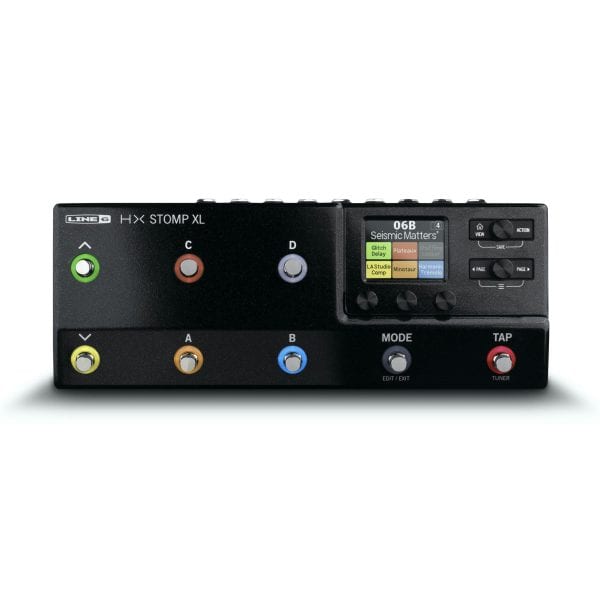







Line 6 HX Stomp XL
$ 96.45
Product Description Product Specs/Additional Information Related Videos Audio Product Description HX Stomp, ExpandedThe HX Stomp™ XL amp and effects processor delivers HX® modeling in a performance-ready pedal with eight capacitive-touch footswitches. The same SHARC® DSP chip found in Helix®enables it to run up to eight processing blocks simultaneously, and the footswitches let you access and control those blocks in powerful ways.Footswitches 1-6 – These capacitive-touch footswitches feature color LED rings that convey footswitch assignments and status at-a-glance. Main Display – This 2.4” (6cm) color LCD is your window into the power of HX Stomp XL.Home/View – Press to return to the main Home screen If you ever get lost. Press Home again to toggle between Play view and Edit view.Upper Knob – In Play view, turn to select a preset. Press to open the Preset List. In Edit view, turn to select a block for editing. Press to bypass/enable the selected block. Action – Press to open the Action panel for the selected block or menu. From Edit view, the Action panel lets you move, copy, paste, and clear blocks. Press Home and Action together to open the Save menu for renaming and saving changes to a preset. Press both buttons twice to quick savePage – In Edit view, press to view more parameters for the selected block or menu. Press both < Page and Page > to dive deeper into HX Stomp XL. You’ll find Controller Assign, Global Settings, and other menus.Lower Knob – In Edit view, turn to select the model assigned to the current block. Press to open the Model List.Knobs 1-3 – In Edit view, turn one of the three knobs below the main display to adjust the value of the parameter above it. Press the knob to reset the parameter value. If a rectangular button appears above a knob, press that knob to engage its function.Mode – Press Mode to toggle between Stomp and Preset footswitch modes. Hold Mode for one second to engage Pedal Edit mode, which lets you edit effects with your feet.Tap/Tuner – Press two or more times to tap in the BPM (beats per minute) of any tempo-based effects such as delay or modulation. Press and hold for one second to open the Tuner. Product Specs/Additional Information Related Videos Audio